
ArcReader: Novel Offline & TTS - A Review and Download Guide
Screenshots


Introduction
ArcReader: Novel Offline & TTS is a beautifully designed, customizable reader and audiobook app developed by Not A Simple Studio, specifically tailored for fiction lovers. This innovative app allows users to read and listen to novels offline, eliminating the need for a constant internet connection. With no sign-up required and no paywalls, users can dive straight into their favorite stories. The app features an advanced AI-driven text-to-speech capability, enabling users to enjoy audiobooks directly from their device without incurring data costs. Whether you're on a long flight or commuting through a subway tunnel, ArcReader ensures that your reading experience is uninterrupted.
Graphics & Gameplay
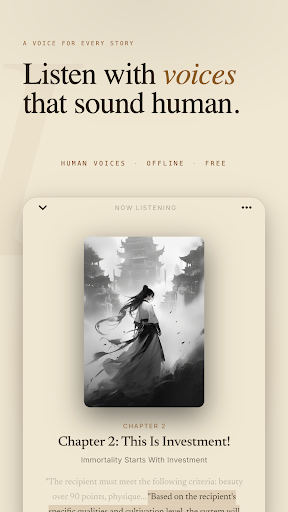
The visual design of ArcReader is sleek and user-friendly, as depicted in the provided screenshots. The app offers four distinct themes: Light, Dark, Sepia, and Black AMOLED, allowing users to customize their reading environment according to their preferences. The interface is intuitive, with easy navigation and clear options for adjusting fonts, line spacing, and margins. The paginated mode, featuring smooth page-turn animations, adds a pleasant touch to the reading experience.
Moreover, the app allows for color-coded highlights and notes, making it easy for users to mark important sections of text. The graphics are crisp and well-rendered, enhancing readability and overall enjoyment. The lock-screen controls and customizable settings for text-to-speech add a layer of convenience, making it adaptable to various reading styles.
Key Features
- Offline Reading: Downloaded chapters are stored locally on your device, ensuring access to your library without the need for internet connectivity.
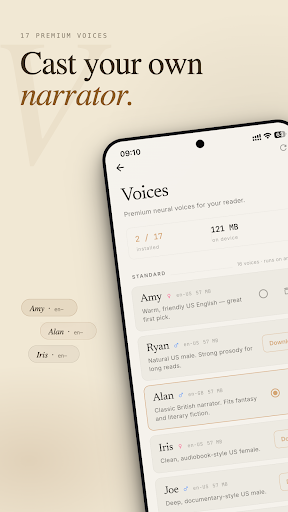
- AI Text-to-Speech: The on-device neural text-to-speech feature allows for seamless narration without internet usage. Users can adjust the speed from 0.75x to 2x, enabling a personalized listening experience.
- Customizable Reader Options: The app provides extensive customization options including four themes, adjustable fonts, line spacing, and margins, catering to individual reading preferences.
- Highlighting and Note-taking: Users can highlight text in four different colors and add notes, making it easy to engage with the material.
- Auto-Save Feature: ArcReader automatically saves your reading position every few seconds, ensuring that you don't lose your place.
- Daily Rewards and Statistics: The app includes features such as daily login rewards, reading streaks, and statistics to keep you motivated and engaged.
- Cross-Device Sync: For users who read on multiple devices, ArcReader offers reading progress sync across devices.
Mod Features
- Premium Unlocked: Enjoy all premium features without the need for a subscription, including access to advanced cloud voices for ultra-realistic narration.
- No Ads: Experience uninterrupted reading and listening without any advertisements disrupting your flow.
- Unlimited Credits: Access bonus monthly credits for premium voice options and other in-app purchases without limitations.
- Enhanced Customization: Unlock additional themes and font styles, allowing for an even more personalized reading experience.
- Priority Support: Get faster assistance and support for any issues you may encounter while using the app.
How to Install APK on Android
Installing the ArcReader APK on your Android device is a straightforward process. Follow these steps to get started:
- Download the ArcReader APK file from a trusted source. Ensure that you have permission to install apps from unknown sources in your device settings.
- Go to your device’s Settings, then navigate to Security. Toggle on the option for “Unknown Sources” to allow installation from outside the Google Play Store.
- Locate the downloaded APK file in your device's file manager or downloads folder.
- Tap on the APK file to begin the installation process. Follow the on-screen prompts to complete the installation.
- Once installed, you can find ArcReader in your app drawer. Open the app and start enjoying your novels!
Conclusion
ArcReader: Novel Offline & TTS stands out as a versatile and user-friendly app for both reading and listening to novels. Its offline capabilities, customizable features, and built-in AI narration make it an excellent choice for fiction enthusiasts. With a seamless interface and no barriers to entry, users can quickly immerse themselves in their favorite stories anytime and anywhere.
Ready to enhance your reading experience? Download ArcReader: Novel Offline & TTS now!